
Your chatbot is only as good as its knowledge. The Knowledge page - opened from your widget's AI Agent tab - is where you feed it websites, documents, and curated Q&A, and where you continuously improve it from real visitor feedback. This guide covers every source type and the practices that produce accurate answers. See how it fits into a ChatGPT chatbot trained on your content.
The Knowledge Page at a Glance
- Sources - Website pages, sitemaps, and uploaded files the bot is trained on, with per-source status, retrain, and delete.
- Q&A - Hand-written question/answer pairs that take priority for exact matters like pricing and policies.
- Improve - Visitor thumbs-down feedback turned into training fixes (Admin/Manager only). Covered in Improving Response Quality.
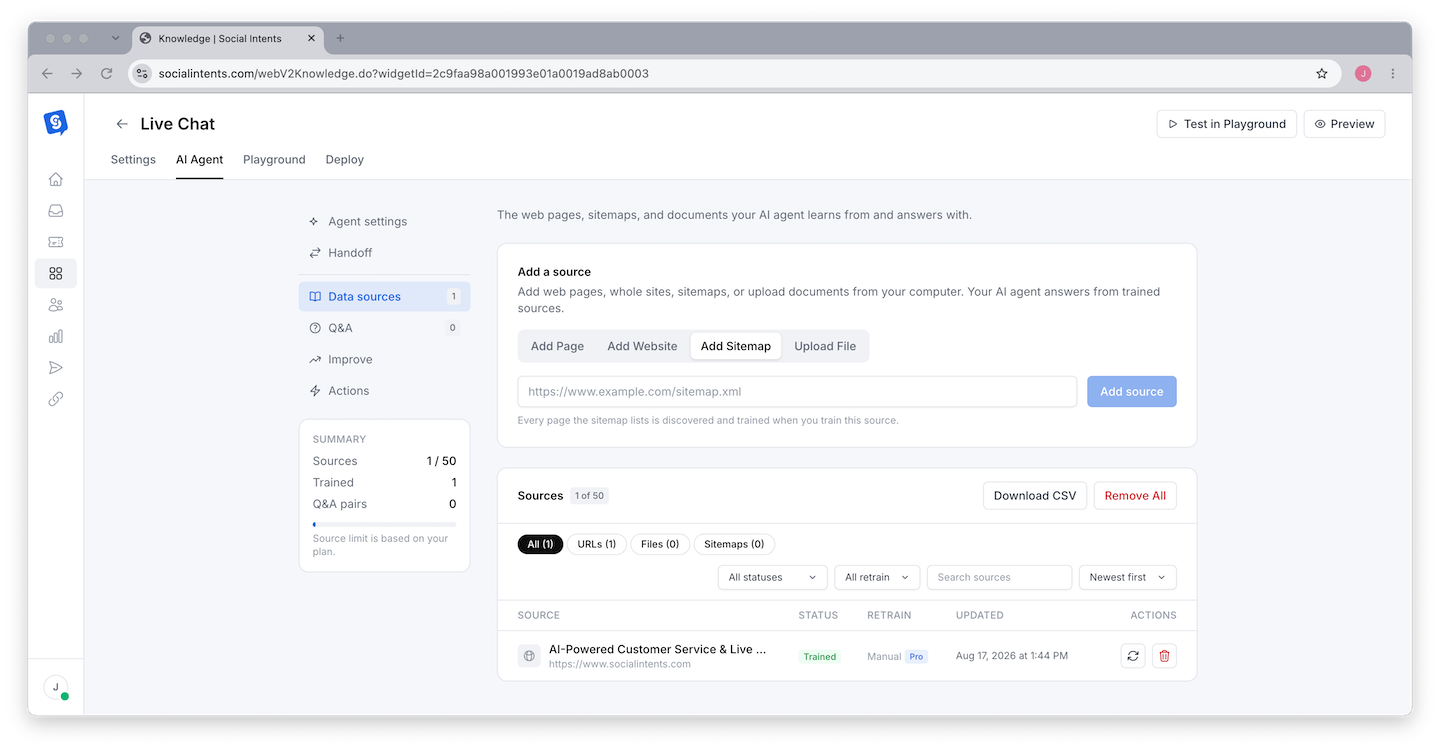
Adding Sources
Add Website (crawl)
Enter a starting URL and the crawler discovers and imports linked pages on the same site. Best for training on your whole site or a section like /help. Review the imported list afterward and delete pages that should not inform answers (careers, legal boilerplate, old blog posts).
Add Sitemap
Point at an XML sitemap (yoursite.com/sitemap.xml) to import exactly the URLs it lists. The most precise way to train on a large site - no crawler guesswork.
Add Page (single URL)
Import one specific page. Use it to top up training after publishing a new page without re-crawling everything.
Upload File
Drop in PDFs, Word documents, or text files - product sheets, internal FAQs, policy docs that are not on your website. Uploading a CSV of URLs bulk-imports every URL listed, which is the fastest way to train on a curated page list.
Training and Maintaining
Train
Click Train All after adding sources. Each row shows its status; large imports process in the background.
Retrain After Changes
Training is a snapshot - the bot does not see website edits until you retrain that source (the refresh icon per row, or Train All). Add "retrain the bot" to your content-publishing checklist.
Curate
Use the search, type filters (URL / file / sitemap), and sorting to audit what's trained. Download CSV exports the full source list; Remove All clears it when you want to rebuild from scratch.
Using Q&A Pairs
Q&A pairs are exact answers you write yourself, and the bot strongly prefers them when a visitor's question matches. Use them for:
- Precision-critical answers - prices, refund windows, SLAs, compatibility - where paraphrasing from a web page risks drift.
- Questions your site never answers directly - "Do you offer discounts for nonprofits?"
- Corrections - when a transcript shows a wrong answer, a Q&A pair is the fastest permanent fix.
What Trains Well (and What Does Not)
| Trains well | Trains poorly |
|---|---|
| FAQ and help center pages | Pages that are mostly images or video |
| Product and pricing pages with real text | Content behind logins or paywalls |
| Policy pages (shipping, returns, privacy) | Heavily scripted single-page apps with no server-rendered text |
| Plain-text and document uploads | Spreadsheets of raw numbers with no context |
Frequently Asked Questions
How much content can I train on?
Training capacity scales with plan tier. Most teams need far less than they expect - 200 well-chosen pages beat 2,000 unfocused ones. See Chat Limits, Agent Limits & Usage.
Does the bot browse the live web when answering?
No. It answers from trained knowledge only, which is what keeps answers consistent and on-brand. That is also why retraining after content changes matters.
Can I train on a competitor's site or third-party docs?
Technically the crawler will import any public URL, but train only on content you have the right to use - and remember the bot will represent whatever you feed it as your answer.
Why does the bot miss content from a page I trained?
Most often the page renders its text with client-side JavaScript, so little text was imported. Check the page's "view source" for the actual copy; if missing, add the content as a file upload or Q&A instead.