
A chatbot is never "done" - the teams with the best bots run a short weekly improvement loop instead of a big one-time setup. Social Intents gives you three feedback surfaces: visitor thumbs ratings, the Improve tab that turns negative feedback into fixes, and transcripts in Analyze. Here is the loop and how to run it.
The Improvement Loop
- Collect - Visitors rate bot answers with thumbs up/down in the chat.
- Review - The Improve tab lists every thumbs-down with the visitor's question and the bot's answer.
- Fix - Generate a corrected Q&A pair, fix source content, or adjust instructions.
- Verify - Retest in the Playground; watch the same question stop failing.
The Improve Tab
Open Chat Widgets → your widget → AI Agent → Knowledge → Improve (visible to Admins and Managers). Each row is a real visitor interaction that went wrong - the question asked, the answer given, and any comment.
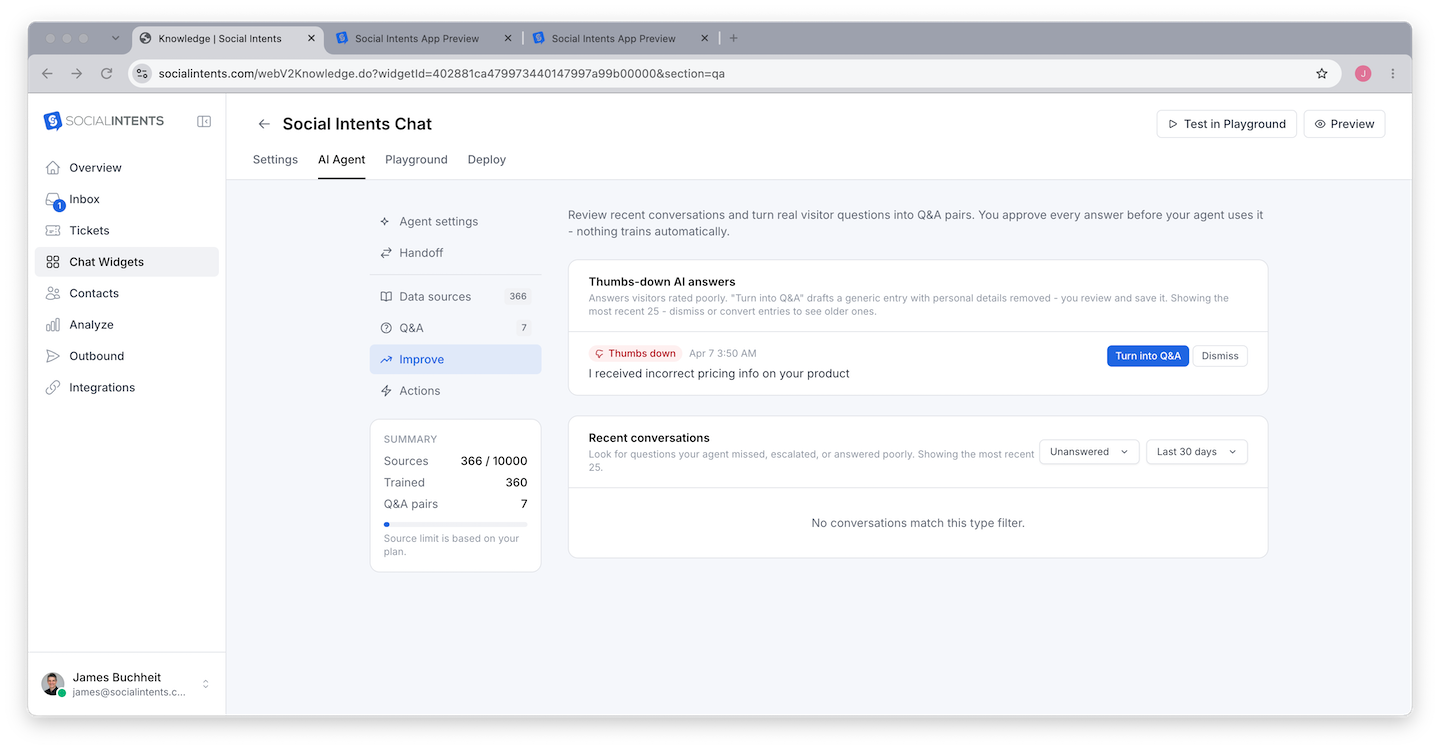
For each item you can:
- Generate a Q&A draft - One click drafts a corrected, reusable question/answer pair from the feedback (with personal details stripped). Edit the answer to be right, save, and the bot uses it from then on. This is the fastest path from "bad answer" to "fixed forever".
- Dismiss - Remove items that are not actionable (spam, off-topic tests).
Mining Transcripts
Thumbs feedback only catches visitors who bothered to rate. Once a week, skim bot conversations in Analyze and look for three patterns:
- Repeated questions - The same question appearing daily deserves a dedicated Q&A pair, even if the bot's answer is passable.
- Silent failures - The bot answered confidently but wrongly, and the visitor left. These never show up in feedback; only transcript review finds them.
- Escalation clusters - Many handoffs on one topic mean the knowledge base is missing that topic entirely.
Choosing the Right Fix
| Root cause | Fix | Where |
|---|---|---|
| Fact missing from knowledge | Add the page or document, retrain | Knowledge → Sources |
| Fact wrong or paraphrased loosely | Exact Q&A pair (takes priority) | Knowledge → Q&A |
| Right facts, wrong behavior/tone | Adjust instructions | Playground |
| Answers too long or erratic | Lower response length / creativity | Playground response style |
| Complex reasoning failures | Try a stronger model tier | AI Agent tab |
Metrics That Tell You It's Working
- Thumbs-down rate trending down week over week.
- Escalation rate stabilizing - not zero (handoffs are healthy), but no longer dominated by one missing topic.
- Repeat questions disappearing from transcripts after you add their Q&A pairs.
All three are visible across Analyze reports - see Feedback and Satisfaction Scores.
Frequently Asked Questions
How do visitors rate answers?
Thumbs up/down icons appear on bot answers in the chat widget when AI feedback is enabled in your widget settings. Ratings flow to the Improve tab automatically.
Who can see the Improve tab?
Admins and Managers. Agents do not see it. Roles are managed under Settings → Team - see Understanding Roles.
How much time does this take?
Fifteen minutes weekly is enough for most teams: clear the Improve queue, skim a handful of transcripts, add two or three Q&A pairs. The compounding effect over a quarter is dramatic.